



PulseMDPulseMD

Patient feedback, experience & outcomes software

Turn what people tell you into better care.

PulseMD connects real-time feedback, patient and family voice, and lived experience with surveys, PREMs and PROMs. Help your team understand what matters, follow up with people and see whether care is improving.

Hear what matters today. See what is changing over time. Give your team a clear next step.

For quality leaders, service managers and care teams.

INSIDE PULSEMDYour team’s day, with the next step in view
PulseMD workspace showing work needing attention, changing themes, recent feedback and follow-up reviews
See the signal. Find the next step. Keep the follow-through in view.Product walkthrough · fictional demo data · select to enlarge

Hospitals · Aged care · Disability services · Community & home care

Find your care setting →
Watch the experience

A small moment to share. A clearer way to respond.

See how a patient opens a QR feedback experience, shares what happened and, through a separate care invitation, stays connected with their team. Follow the journey on real product screens.

A family member speaks “Nobody explained why Mum’s evening routine had changed”, selects communication and shares the observation. This is an animated example using fictional data.

Animated voice-capture example. No microphone access or recording.

From a QR code to ongoing careRecorded product walkthrough · fictional demo data · audio and captionsWatch this demonstration on its own page →
Read the film transcript

Meet Aroha. Her cancer journey unfolds over months: treatment planning, chemotherapy, recovery and follow-up. This fictional story uses real PulseMD screens at Te Awa Health. At hospital, Aroha can start with something as simple as a QR code. This is an existing patient feedback code for the Oncology Day Unit. Scanning it opens the hospital's feedback experience in a phone browser. There is no app to download. The public feedback code is an entry point for service feedback. It does not unlock a private patient record or enrol someone in identified care. The provider chooses the capabilities relevant to its services: real-time feedback, scheduled Heartbeat check-ins, care-team follow-up and requests for contact. Aroha encounters these through the appropriate patient experience or care invitation. During treatment, Aroha wants to explain a mixed experience. The nurses have been wonderful, but she was unsure who to contact when her treatment appointment changed. She types the observation in her own words. She continues, chooses anonymous and shares the signal. Here is the recorded submission and its receipt from our fictional demo. Her name is not attached through this pathway, and the comment does not become an entry in her identified Care record. People should still avoid putting identifying details in the words they submit; choosing anonymous cannot make identifying content anonymous. This existing oncology theme brings together concerns about waiting for chemotherapy. This is a separate example; we are not claiming Aroha's comment has already joined it. PulseMD supports AI-assisted themes with human review. This curated demonstration uses reviewed theme wording. Now follow Aroha home between visits. Her chemotherapy programme offers a Heartbeat every seven days. Before taking part, the patient can see the purpose, who reads the answers, the team's review hours and urgent-help instructions. Saying no does not change her care. Let's complete the questionnaire using the product's patient preview. We are replaying Aroha's existing week-one answers, without saving another response. First: how much has nausea affected her this week? Aroha chooses somewhat, then moves on. Next: how tired has she felt? She chooses a little tired. Then she answers the third question: how is she managing eating and drinking? This week, the answer is well. Before completing the check-in, Aroha reviews all three answers. She sends the check-in to the team and sees a receipt explaining when it should be reviewed. Several weeks later, the same questions tell a different story. In week four, nausea is affecting Aroha a lot. She selects very tired, and says eating and drinking are okay. She reviews those answers, asks for contact and completes the preview check-in. For the authorised care team, Aroha's actual record brings her answers together over time. Week one and week four can be compared directly. The missed check-in in week two remains visible as well. Staff can consider the sequence rather than treating each questionnaire as an isolated response. Aroha's record already includes a follow-up owned by Aisha Rahman. Staff can review the concern, record a contact attempt and its outcome, and keep the next step visible. Here we open that workflow without saving a new attempt. The team decides what follow-up is appropriate. Aroha can also ask for help with a practical concern. In this separate patient-preview example, she requests an afternoon call and explains that she feels overwhelmed and is unsure who to speak to about her next appointment. The working request form and confirmation show how she can ask the team for contact. This illustration is separate from her saved check-in history. For urgent symptoms or emergencies, Aroha still follows her provider's established clinical pathways. PulseMD complements clinical records, assessment and monitoring. Patient Experience leaders need a wider perspective. Across participating services, themes and trends help them explore recurring concerns, positive experiences and changes over time. In this separate existing example, an equipment issue has owners, tasks and a review, making the organisational response visible. The regional view brings Te Awa's participating hospitals and services into one organisational picture. This is a view within one fictional organisation, not unrestricted sharing of identified patient histories. It can complement surveys, complaints and other feedback processes with a more continuous source of experience information. Return to Aroha. Three perspectives now fit together: her voice, captured simply; her care team's understanding of how her experience changes; and the organisation's ability to learn across services. From feedback at the point of care to check-ins between visits, PulseMD helps teams listen throughout the journey and turn what they hear into meaningful action.

Care management / Between visits

Keep the person, their progress and the next step together.

Give people agreed check-ins to tell you how they are doing. Bring their answers, contact requests and follow-up into a person-centred caseload.

  • See who needs a review. Read the response in context and see what is due or still unowned.
  • Pick up where a colleague left off. Keep contact attempts, responsibility and next steps visible to the authorised team.
  • Understand change over time. Review questionnaire responses and eligible measure histories alongside missing check-ins.

Private care stays private. Authorised teams access care records within the care workflow. Your service sets review hours and response responsibilities.

Care caseload with team filters, people needing review, reasons, owners, due times and check-in history
One view of the person, the reason for review and the next follow-up.Product walkthrough · fictional demo data · select to enlarge
PREMs & PROMs / Ongoing measurement

Hear how care feels. See how people are doing. Act while it matters.

Bring patient-reported experience measures (PREMs) and outcome measures (PROMs) into the care journey. Schedule the right questions, review responses as they arrive and follow change over time.

PREMs: the experience of care

Understand communication, involvement and the experience of your service through agreed experience measures.

PROMs: health and quality of life

Use appropriate outcome measures to understand symptoms, function and reported wellbeing at agreed timepoints.

Care management: the next step

Bring responses into the team’s review workflow, with responsibility, contact history and follow-up visible.

Measurement that stays connected to the person.

  • Ask at the right moment. Set repeating check-ins and assessments around dates such as discharge, with baseline and follow-up timepoints.
  • Keep up as answers arrive. Review incoming responses and configured review-rule flags in the care workflow, within your team’s agreed coverage.
  • See change, and see what is missing. Follow score histories and open the original answers. Missed check-ins stay visible rather than appearing as zero scores.
  • Understand programme results. Compare eligible paired responses and keep participation and missing data alongside the outcome.

Real-time visibility of submitted information supports team review; it does not promise continuous observation or an immediate clinical response. Measures require the appropriate permissions, scoring and service approval.

Patient check-ins and score history with individual responses available to review
Follow reported progress over time, then open the answers behind a score.Product walkthrough · fictional demo data · select to enlarge
Programme design and measurementRecorded product walkthrough · fictional demo data · audio and captionsWatch this demonstration on its own page →
Read the film transcript

A care programme needs more than a set of questions. It needs a purpose, a schedule, people who will review the answers, and a clear account of what its results mean. This walkthrough uses Te Awa Health’s fictional heart failure recovery programme. Its symptom score and results are illustrative, not a claim about a validated clinical measure or customer outcomes. The programme page brings participation and current work together. People remain on the version they joined. A published version can be in use while changes are being prepared in a draft. The cohort shows check-in history and any reason for attention, linking the programme design to the team’s everyday work. Open the existing draft to see the design steps. The programme begins with a template, then covers who joins, anchors and timepoints, measures, review rules, messages and review hours. The participant preview sits alongside the configuration. That lets the team connect each design decision with what a person will actually see. The published schedule uses discharge as its anchor. It asks at discharge, six weeks, three months and six months. Each point has an answer window, and the primary comparison is identified. The table shows which measure, heartbeat and custom questions are included, together with the expected effort. Timing is part of the meaning of the result, not just a reminder setting. Review and rules define how the team handles responses. Here the mode is every response read. The configured rules include a request for contact, breathlessness at night, and a change in the symptom score. Clinical rules show a named approver and a review date. An operational rule covers repeated closed windows without an answer. These rules create work for people; they do not replace clinical judgement. Review hours and routing belong to the care team. The programme’s participant wording explains who reads answers, while urgent-help information remains visible. A service needs a workable review commitment, including what happens outside those hours. The software makes that arrangement explicit, rather than implying that an online answer is monitored continuously. Before reading outcomes, look at response. The table separates answered, missed, not sent and skipped check-ins. In this example, the six-week and three-month windows each have fourteen answers from sixteen closed windows. A skipped check-in is excluded from the rate. A check-in that was never sent is a team-side gap, rather than a failure attributed to the person. The outcomes view starts with the funnel. Seventeen people have an in-window baseline, sixteen have reached a closed primary window, and fourteen have a paired result. That is the group the comparison describes. The chart keeps the full score scale and shows separate timepoint groups. It does not draw a continuous line that implies every point contains exactly the same people. The paired comparison shows a mean change and an uncertainty interval. The page also warns that people who answer at follow-up may differ from those who do not, and that these figures are not adjusted for case mix. Small groups are suppressed. In this demo, the numbers illustrate how a result is presented; they do not establish that the service caused a clinical benefit. Return to the cohort and the design has a practical purpose. Questions arrive at meaningful points, review arrangements are visible, and the team can see outstanding follow-up alongside participation. A programme can be refined without silently rewriting the version that existing people joined. PulseMD brings programme design, everyday response and measurement into one connected workflow. The value is a clearer account of what was asked, who was heard, what the team did, and what the resulting evidence can support.

A family member sharing a moment with a person receiving care
Why PulseMD exists

The people closest to care notice what could be better. Help their insight go further.

A family is unsure who to ask. A nurse sees the same delay on every shift. Someone remembers the kindness that made a difficult day easier.

You want to hear these things. But comments in corridors, separate survey reports and actions buried in meeting notes make it hard to see the whole picture and follow through.

PulseMD gives that everyday listening a practical route into understanding, responsibility and change.

01

Collect

Voice, text, ratings and surveys make room for different ways to contribute.

02

Understand

Review recurring themes and survey findings with the evidence behind them.

03

Act

Agree an owner, tasks and a review date. Keep the response visible.

04

Learn

Check what changed, share an approved update and keep listening.

01 / Make it easy to contribute

A passing observation. A quick rating. A question worth asking.

Capture patient and family voice and lived experience in the moment, through voice, text, ratings and surveys. Give people room to describe care in their own words, with staff observations alongside to help your team understand the whole picture.

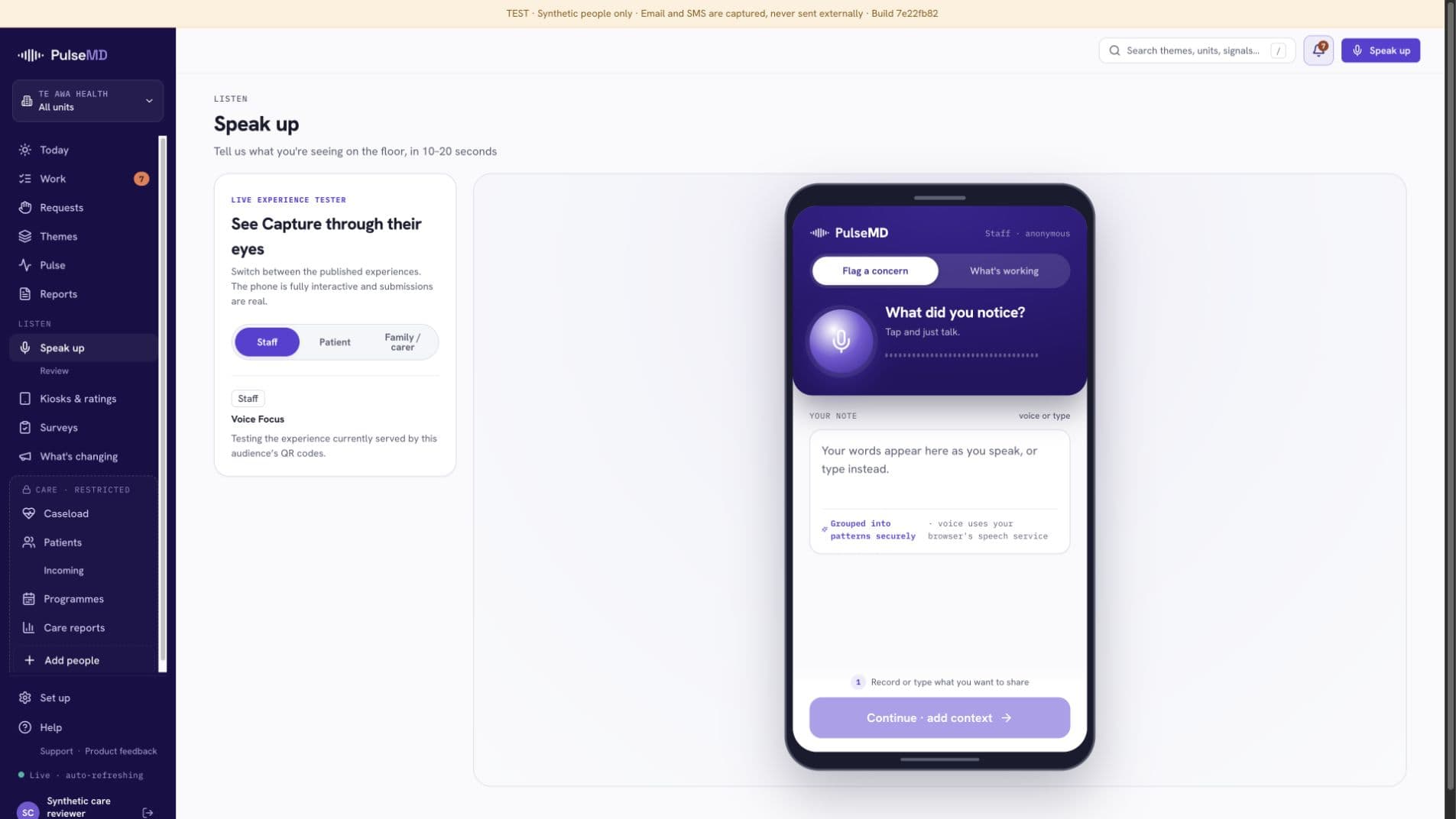
PulseMD’s actual staff phone preview, with voice recording, text entry and the Continue control inside the device frame
Speak or type. Add the context.Actual product phone preview · staff experience

Voice & text signals

For the things you didn’t know to ask

Place a QR touchpoint where care happens. People open the capture page and share a concern or something that went well, in their own words.

Less reliance on someone remembering it for the next meeting.

Kiosks & ratings

For a quick response at the point of care

Set up a shared tablet with a published rating screen. Choose its location and presentation, and manage the devices used by your services.

A simple way to participate without needing a personal device.

Structured surveys

For the questions you need to answer

Build a questionnaire, choose who it is for and when it runs, then share its link or QR code. Review scores and comments with their collection context.

Ask consistently and keep the detail behind the answer.

Bedside requests

For a practical need that needs a response

Offer a menu of practical requests and route them to the staff request board. Keep immediate service needs distinct from longer-term improvement work.

A clear place for staff to see and manage incoming requests.

Your service explains the participation and privacy arrangements for each channel. Urgent help, incidents and safeguarding keep their established routes.

Surveys with a purpose

Ask the right question. Understand the answer.

Want to understand discharge communication, a recent visit or a change to your service? Build a survey around that question.

  1. DesignChoose questions and answer types. Use branching to ask relevant follow-up questions, and preview the experience as you build.
  2. ShareSet the audience and collection window. Share the survey link, download its QR code or print a poster.
  3. ReviewSee results with the question version and reporting period. Review comments and prepare a finding that can inform improvement work.
Survey designer showing satisfaction and written questions, conditional branching and a phone preview
Build the question and see exactly what someone will be asked.Product walkthrough · fictional demo data · select to enlarge
02 / Understand what is recurring

Less sorting through comments. More understanding of the issue.

PulseMD groups related signals into themes that your team can review. See the observations behind a pattern, refine the issue and decide where attention will help.

Operational pulseMeridian Care
Live

PulseMD groups protected observations into the rising theme “Communication and routine changes”, with 14 signals across 3 services.

Animated example with fictional data: three observations becoming a theme.

Keep the story behind the signal.

  • Hear more than the loudest voice. See recurring concerns across contributions.
  • Notice what is working. Recognise positive care and practice worth repeating.
  • Keep people in charge. Review the grouping and evidence before deciding on action.
Current Themes screen linking signals heard to reviewed themes and improvement status
See the path from signals heard to themes being acted on.Product walkthrough · fictional demo data · select to enlarge
Current leadership report with contribution context, emerging themes and next steps
Bring the evidence and next steps into a leadership conversation.Product walkthrough · fictional demo data · select to enlarge
PulseMD Today workspace showing owned work, follow-up reviews, recent signals and changing themes
Start the day with what needs you, what is changing and what is due for review.Product walkthrough · fictional demo data · select to enlarge
03 / Turn understanding into work

Know what needs you. And who is doing what.

An issue shouldn’t depend on someone keeping it in their head. Give the response an owner, tasks and a due date, with the evidence beside it.

  • Less chasing for updates. See what is waiting, underway and due for review.
  • Less rebuilding the story. Keep the original issue and supporting observations connected to the work.
  • A clearer next conversation. Review whether the change helped, then prepare an approved update for the people who contributed.
04 / Close the loop

Show people their voice went somewhere.

Agree the response, keep its progress visible and tell people what changed. Then listen again to understand whether it helped.

RisingCommunication and routine changes14 protected signals
  1. 1
    AcknowledgedLeadership has seen the pattern
  2. 2
    ActionedOwned by Clinical Operations
  3. 3
    SharedFamilies now receive a same-day note when evening routines change.
Leadership acknowledges and acts on Communication and routine changes, then shares the update “Families now receive a same-day note when evening routines change.” back with the frontline.

Illustrative improvement journey with fictional data.

Built around the people you care for

Different services. The same need to be heard.

Patients, residents, clients, families and frontline teams see different parts of the experience. Make space for each perspective.

Fit it to your service

Start with one listening need. Build from there.

A ward’s feedback. A discharge survey. An improvement priority. A care programme. Choose a useful starting point and agree who will respond.

PulseMD works alongside your clinical records, incident reporting and governance processes. Connections to existing systems are scoped and configured for your service.

Private care stays private. We keep care records separate from service feedback and manage deployments for local regulatory requirements, including local hosting.

Explore privacy, access and governance

You keep looking for ways to make care better. Let’s put that insight to work.

Bring a listening challenge, a survey or a follow-up workflow. We’ll walk through how PulseMD could help your team, using the screens and steps that matter to you.

A relevant walkthrough. A practical conversation. No pilot commitment. · Explore the Trust Center

PulseMD in United States

Patient experience and ePRO in the United States

Connect patient feedback and electronic patient-reported outcomes with between-visit follow-up for health-system and ambulatory care teams.

  1. 01

    Define the cohort, reported measures and staff responsibilities around a specific care journey.

  2. 02

    Review required connections to existing systems and confirm the scope before implementation.

  3. 03

    Agree US hosting, access, applicable data agreements and review arrangements for the deployment.